Clinic Management Software Pakistan: Features & Modules Guide
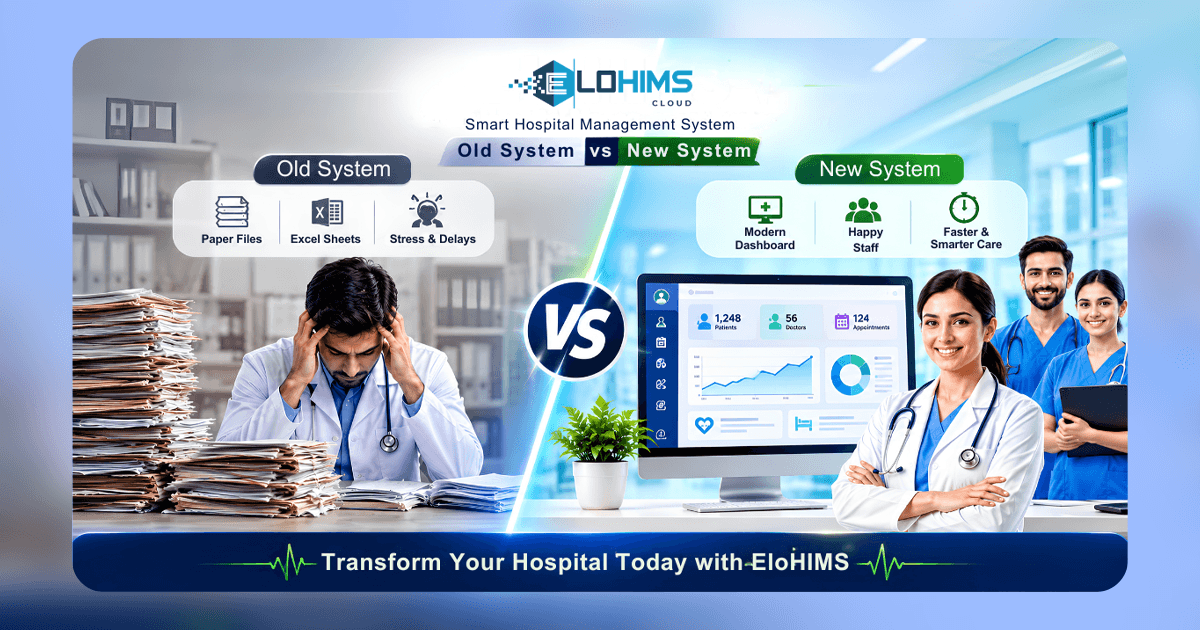
In Pakistan's evolving healthcare landscape, modern clinic management software must balance operational efficiency with regulatory compliance. From OPD queue management and EMR to FBR-compliant billing and PHC statutory registers, the right system integrates patient care, revenue cycle, and compliance in one platform. This guide breaks down the essential features, growth modules, and advanced capabilities that define world-class clinic software for Pakistani medical practices.
Introduction: Why Unified Software Matters for Pakistani Clinics
Pakistani clinics — polyclinics, day-care centers, specialty clinics, and diagnostic facilities — face mounting operational pressures. Patient volumes are rising, especially in urban centers like Lahore, Karachi, and Islamabad. Punjab Healthcare Commission (PHC) and Sindh Healthcare Commission (SHCC) compliance audits demand meticulous record-keeping. Federal Board of Revenue (FBR) POS and QR code invoicing mandates add regulatory complexity. Meanwhile, staff shortages force clinic administrators to do more with less.
The root problem isn't lack of effort — it's fragmented systems. Many clinics patch together separate tools: one software for billing, a different one for appointments, Excel spreadsheets for pharmacy inventory, and paper-based EMR files. This creates data silos where patient information exists in multiple places but never fully syncs. The result: duplicate data entry, compliance gaps, revenue leakage from unbilled services, and month-end reconciliation chaos when billing totals don't match accounting records.
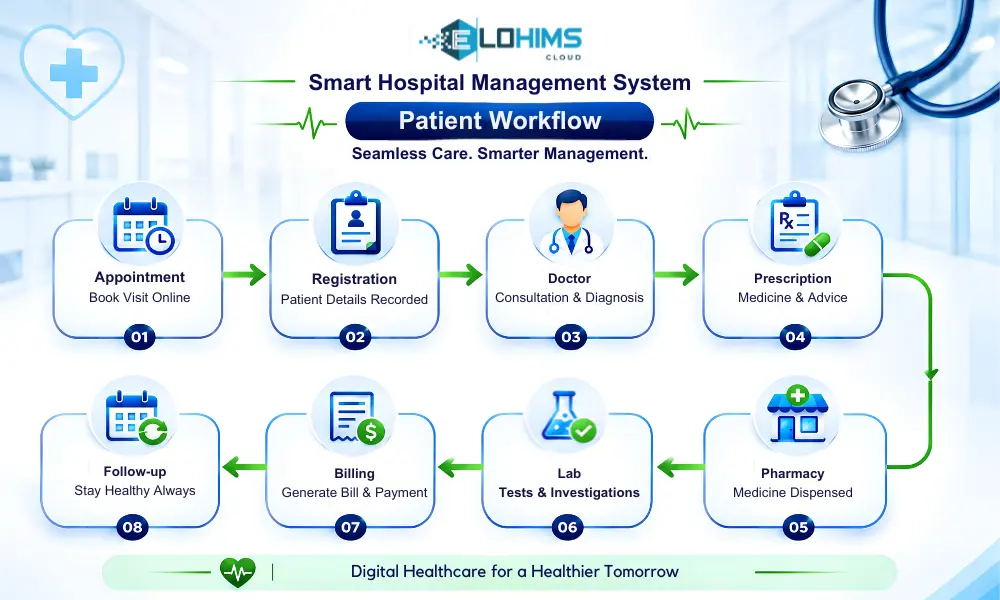
Unified clinic management software solves this by covering the complete workflow on a single platform: appointment booking → patient registration → OPD consultation → prescription → pharmacy dispensing → laboratory tests → billing → financial reporting → compliance registers. When every module shares one database, information flows automatically — doctors see lab results instantly, pharmacy charges post to billing without re-entry, and statutory registers populate from live clinical activity.
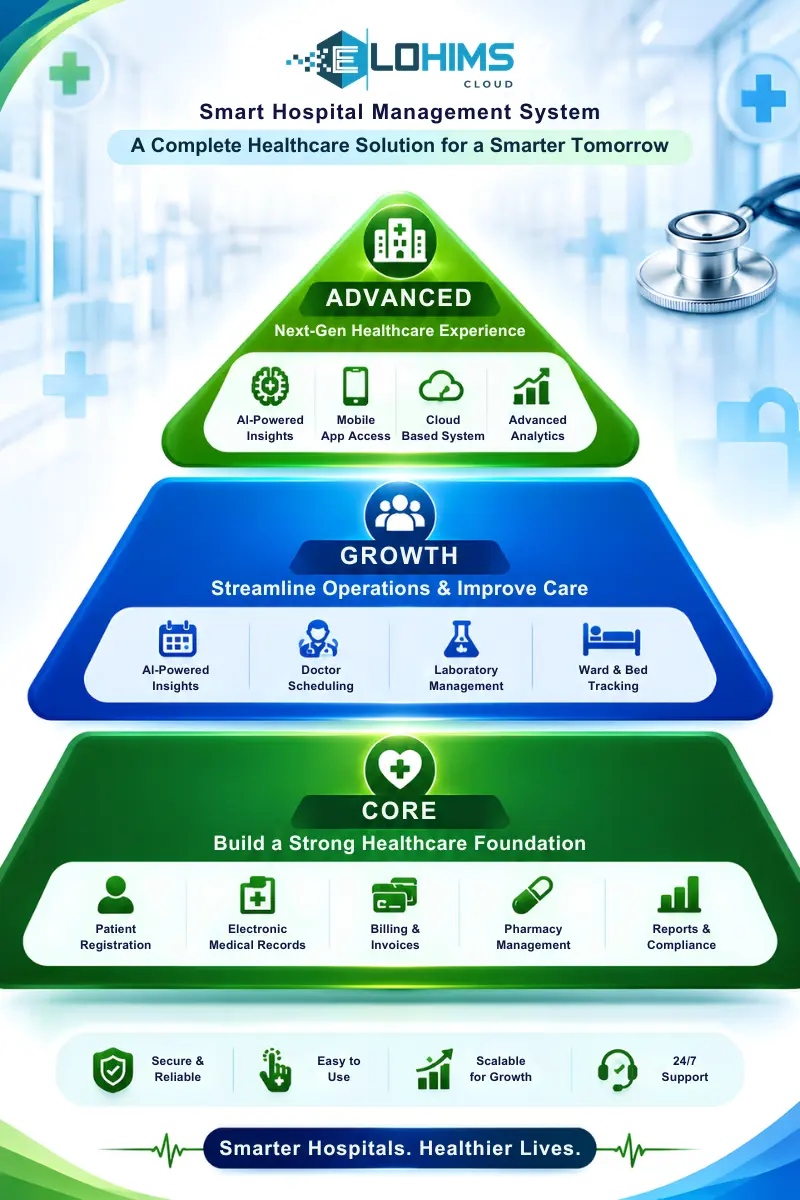
 This guide organizes clinic software features into three tiers: Core (what every clinic needs from day one), Growth (what scaling clinics add as they expand services), and Advanced (differentiating capabilities that eliminate third-party tools and streamline operations). We'll also cover how to evaluate vendors through the lens of Pakistan's regulatory reality.
 Core Features — What Every Clinic Needs
Patient Registration & MRN Management
Every patient interaction starts with accurate registration. A robust clinic management system maintains a centralized patient database where each individual receives a unique Medical Record Number (MRN) that follows them across all visits and services.
The registration module should capture complete demographics: patient name (with proper handling of common names like "Muhammad" that require father's name or CNIC for disambiguation), CNIC for identity verification, contact details (mobile, alternate phone, email), address, emergency contact, and next of kin information. Photo capture capability adds an extra layer of identity verification, particularly useful for insurance panel patients or when multiple family members share similar names.
Duplicate-patient detection prevents the most common registration error — creating a second MRN for an existing patient. The system should alert staff when entering a name, phone number, or CNIC that matches an existing record, allowing the receptionist to verify identity before proceeding. This maintains data integrity and ensures clinical history stays unified under one MRN.
Patient search functionality determines how quickly staff can locate records during emergencies or high-volume OPD hours. Search should work instantly across multiple fields: MRN, patient name (partial match), phone number, and CNIC. A three-second search delay becomes a productivity drain when processing 200+ patients daily.
Evaluation criteria: Can the system handle 500+ new registrations per day without slowing down? Does it prevent duplicate MRNs through real-time alerts? Can reception staff search and retrieve patient records in under 5 seconds during rush hours?
Appointment Scheduling & Queue Management
Pakistani clinics operate on a hybrid model: some patients book advance appointments while most walk in expecting same-day consultation. Effective appointment scheduling system software must support both workflows seamlessly.
The appointment calendar should display multi-doctor schedules in day, week, and month views, allowing staff to book slots while visualizing doctor availability. Time-slot configuration needs flexibility — a general physician might see patients every 15 minutes while a cardiologist needs 30-minute slots for detailed consultations.
Walk-in queue management is equally critical. Token-based OPD queuing assigns each patient a number and displays real-time queue status on digital screens, reducing front-desk inquiries about wait times. The system should automatically prioritize emergency cases, allow doctors to pause queues during lunch breaks, and track average wait times to identify bottlenecks.
SMS and WhatsApp appointment reminders significantly reduce no-show rates, particularly for specialty consultations where patients book days or weeks in advance. Automated reminders 24 hours before the appointment, with the doctor's name, time, and location, improve attendance and reduce wasted slots.
Doctor-wise patient load tracking helps administrators balance workload. If one doctor has 60 patients queued while another has 15, management can adjust schedules or reassign patients to maintain reasonable wait times and prevent physician burnout.
Evaluation criteria: Does the system support walk-ins alongside booked appointments? Can patients or their families see live queue status on a public display? Does it integrate with local SMS gateways for appointment reminders at reasonable per-message rates?
OPD EMR (Electronic Medical Record)
The OPD EMR module is where clinical documentation happens, and its design directly impacts consultation speed and quality. In high-volume Pakistani OPD settings, doctors need to complete clinical notes in 3-5 minutes per patient while maintaining medico-legal documentation standards.
A comprehensive EMR captures the patient's chief complaint, history of present illness, past medical history (chronic conditions, previous surgeries), family history (hereditary conditions), and social history (smoking, occupation, lifestyle factors). Vital signs recording should auto-calculate BMI from height and weight entries and flag abnormal values (hypertension, fever, low SpO2) for physician attention.
Clinical examination templates save significant time. Rather than typing paragraphs, doctors select from system-wise templates (cardiovascular, respiratory, abdominal, neurological) with normal findings pre-filled and abnormalities added via dropdown or free text. For specialty clinics, customizable templates allow an ophthalmologist to document slit-lamp findings or a dermatologist to map lesion locations.
Diagnosis entry with ICD-10 coding support becomes essential when handling insurance panel patients, as TPAs (third-party administrators) require standardized diagnosis codes for claim processing. Even cash-based clinics benefit from structured diagnosis entry for epidemiological reporting and follow-up care coordination.
Prescription generation must support bilingual output — Urdu and English — as many patients, particularly elderly or less-educated populations, cannot read English prescriptions. The system should allow doctors to select medicines from a formulary, specify dosage and duration, and print prescriptions with clear Urdu instructions (e.g., "دن میں تین بار کھانے کے بعد").
Clinical notes should timestamp every entry and maintain an audit trail showing which user (doctor, nurse, medical officer) documented each section. This medico-legal requirement protects the clinic in case of disputes.
Evaluation criteria: Can a doctor complete a routine OPD consultation (vital signs, examination, diagnosis, prescription) in under 5 minutes? Does the EMR support Urdu prescriptions without font or character encoding issues? Can doctors customize clinical templates for their specialty without IT assistance?
EloHIMS edge: Urdu-bilingual prescription output, fully customizable clinical templates, and integrated CPOE (Computerized Physician Order Entry) where lab and radiology orders flow directly from the EMR to respective departments without paper requisitions.
Pharmacy Management & Inventory
Clinic pharmacy operations involve dispensing prescribed medications while maintaining accurate inventory and preventing stock-outs or expired-medicine errors. Effective pharmacy management with FEFO automation ensures patient safety and financial accuracy.
The medicine master database stores every item with generic name, brand name, strength, and dosage form (tablet, syrup, injection, cream). This allows pharmacists to substitute generics when branded medicines are out of stock or patients request cost-effective alternatives.
Batch and lot tracking with expiry dates enables First Expiry First Out (FEFO) dispensing logic. When a pharmacist scans or selects a medicine, the system automatically suggests the batch closest to expiry, reducing medication waste. Expiry alerts prevent accidental dispensing of expired stock — a serious patient safety and regulatory violation.
Stock management covers the full cycle: purchase orders to suppliers, goods received notes with batch-level entry, stock adjustments for damaged or returned items, and minimum stock alerts that notify administrators when inventory falls below reorder points. Automated reorder suggestions based on consumption velocity prevent stock-outs of fast-moving medicines.
Prescription fulfillment workflow should be streamlined: scan patient MRN → system displays active prescriptions → pharmacist dispenses medicines → system auto-deducts inventory and posts charges to the patient's billing ledger. This eliminates duplicate data entry and ensures every dispensed medicine is billed.
Pharmacy billing integration is critical. When pharmacy charges post automatically to the patient ledger, there's no risk of unbilled medications — a common revenue leakage point in manual systems. For clinic profitability tracking, Cost of Goods Sold (COGS) posting shows the actual medicine cost alongside revenue, enabling real-time gross margin analysis.
Evaluation criteria: Does the system enforce FEFO logic to prevent expired-medicine dispensing? Does pharmacy inventory deduction happen automatically upon dispensing (not manual end-of-day adjustments)? Are pharmacy charges integrated with billing so there's zero double entry?
EloHIMS edge: Pharmacy COGS auto-posts to the general ledger in real-time — every medicine sale simultaneously posts revenue (credit) and inventory expense (debit), keeping books balanced without month-end reconciliation. This is particularly valuable for clinics with high pharmacy volumes, where accurate COGS directly impacts profitability analysis.
Billing & Payment Collection
Clinic billing software must handle diverse revenue streams: consultation fees, procedure charges, medication sales, laboratory tests, and radiology services. Modern hospital billing software with built-in GL consolidates all charges into unified patient invoices while supporting multiple payment modes.
A comprehensive billing module generates itemized invoices showing consultation (doctor name, specialty), procedures performed, medications dispensed (with quantity and batch), and diagnostic tests ordered. This transparency builds patient trust and simplifies insurance claim submissions.
Multi-payment-mode support is essential for Pakistani clinics: cash (still the dominant payment method), card (debit/credit via EDC terminals), bank transfer, and insurance panel claims. The system should handle split billing where a patient pays Rs. 2,000 cash while the remaining Rs. 8,000 is claimed from their insurance TPA.
Credit and advance management tracks patient ledger balances. When a patient pays an advance deposit, the system maintains a credit balance that offsets future invoices. Conversely, when services are rendered but payment is deferred (common for panel patients or institutional accounts), the outstanding balance appears in receivables reports.
Cash-shift reconciliation is a daily operational necessity. Each cashier opens their shift with a starting balance, processes transactions throughout the day, and closes with an ending balance. The system calculates expected cash (opening balance + cash receipts - refunds) and compares it to the physical cash count, highlighting variances for investigation. This accountability measure reduces cash handling errors and deters theft.
FBR POS and QR invoice generation is now mandatory for tax-registered clinics and hospitals under FBR regulations. The system must generate invoices containing NTN (National Tax Number), STRN (Sales Tax Registration Number), and a QR code that patients can scan to verify invoice authenticity. Real-time transmission of sales data to FBR servers ensures compliance and avoids penalties.
Evaluation criteria: Can the billing module handle insurance panel claims with pre-authorization workflows? Is FBR POS/QR integration built-in, or does it require third-party hardware? Does the system alert cashiers when daily cash variance exceeds a threshold (e.g., Rs. 500 discrepancy)?
EloHIMS edge: Built-in FBR POS/QR integration, split billing for insurance panels, and cash-shift variance alerts that notify administrators of reconciliation discrepancies before the shift closes.
Growth Features — What Scaling Clinics Add
Laboratory & Diagnostics (LIS/LIMS Integration)
As clinics expand from basic OPD services to in-house diagnostics, they need ISO 15189-ready laboratory information system capabilities that integrate with clinical workflows.
Laboratory test ordering from OPD eliminates paper requisitions. When a doctor orders a CBC or lipid profile during consultation, the order flows electronically to the lab module, where technicians see pending tests, print barcode labels for sample collection, and begin processing without manual entry.
Sample tracking with barcode or QR-based chain of custody ensures specimens are never misidentified. Each sample receives a unique accession number linked to the patient's MRN, and every handling step (collection, receipt in lab, testing, validation, reporting) is logged with timestamps and user IDs.
Result entry interfaces should include normal-range validation that flags values outside reference ranges (e.g., hemoglobin below 12 g/dL for adult females). This clinical decision support alerts technicians and pathologists to abnormal findings requiring physician notification.
Critical-value alerts for panic values (e.g., potassium >6.5 mEq/L, glucose <40 mg/dL) should block report release until a senior technician or pathologist reviews the result and documents a callback to the referring physician. This patient safety feature is a core requirement for ISO 15189 accreditation.
Report generation with bilingual Urdu/English output serves diverse patient populations. Lab reports should export to PDF for email/WhatsApp delivery and print on clinic letterhead with authorized signatures and accreditation logos when applicable.
Turnaround time (TAT) tracking per test monitors lab efficiency. If routine CBC TAT averages 45 minutes but one sample takes 3 hours, the system should flag the delay, allowing lab managers to investigate bottlenecks (equipment failure, staffing shortage, sample quality issues).
Evaluation criteria: Is the laboratory module integrated with OPD and billing, or does it operate as a separate bolt-on system? Can you trace a sample's complete journey from collection barcode scanning to final report delivery? Does the system enforce critical-value authorization before results are released?
EloHIMS edge: ISO 15189-ready LIMS with two-tier verification workflow (technician validates → pathologist authorizes), built-in critical-value alerts, TAT tracking with breach notifications, and full sample chain-of-custody audit trails. This positions clinics for lab accreditation if they pursue CAP (College of American Pathologists) or national accreditation body certification.
Radiology & Imaging (RIS Integration)
In-house imaging services (X-ray, ultrasound, CT, MRI) require a Radiology Information System (RIS) that manages the workflow from order entry through radiologist reporting and result delivery.
Imaging order entry from OPD or emergency departments allows doctors to request studies electronically. The order specifies the modality (X-ray chest PA, ultrasound abdomen), clinical indication, and urgency level, ensuring radiographers have complete context before the patient arrives.
DICOM and PACS (Picture Archiving and Communication System) integration becomes essential when clinics invest in advanced modalities like CT or MRI. DICOM compatibility allows imaging equipment to send studies directly to the clinic's server, where radiologists can review, measure, and annotate images without manual file transfers.
Radiologist reporting interfaces should provide templates for common studies (e.g., X-ray chest reporting template with checkboxes for infiltrates, effusion, cardiomegaly) while allowing free-text descriptions for complex findings. Structured reporting improves consistency and reduces turnaround time.
Report distribution to the referring physician and patient should happen automatically via the EMR integration. When a radiologist finalizes a report, it appears in the OPD doctor's dashboard, enabling immediate clinical decision-making without waiting for paper reports.
Evaluation criteria: If you plan to expand to CT or MRI, does the RIS support DICOM integration, or will you need separate PACS software? Can radiologists access the system remotely for after-hours or weekend reporting?
Insurance Panel Management
Clinics serving corporate clients, government employees, or private insurance beneficiaries need robust panel management tools to handle complex billing arrangements and claim reconciliation.
Panel and TPA configuration stores rate contracts for each insurance provider. When a panel patient registers, the system applies the contracted rates (which may differ from cash rates) and tracks authorization limits, co-payment amounts, and excluded services.
Claim generation produces itemized invoices with diagnosis codes (ICD-10), procedure codes (if applicable), and detailed service descriptions that TPAs require for adjudication. Batch claim export in Excel or CSV format simplifies submission to TPA portals.
Approval workflow management tracks pre-authorization requests for high-cost services. If a panel patient needs an MRI that requires TPA approval, the system logs the approval number, validity period, and authorized amount, preventing claim rejections due to missing documentation.
Panel receivables aging reports show outstanding claims by TPA and aging bucket (0-30 days, 31-60 days, 61-90 days, >90 days). This visibility allows administrators to follow up on overdue claims before they become uncollectible.
Evaluation criteria: Can you configure different pricing tiers for different panels (e.g., TPA-A pays 100% of listed rates, TPA-B pays 80%)? Does the system track claim status (submitted, approved, partially approved, rejected) so you know which claims need resubmission?
PHC/SHCC Compliance & Statutory Registers
Punjab Healthcare Commission (PHC), Sindh Healthcare Commission (SHCC), and the Pakistan Nursing and Accreditation Council (PNAC) require clinics to maintain statutory registers documenting clinical activity. Manual register maintenance is labor-intensive and error-prone; automated PHC and SHCC compliance registers populate from live operational data.
The five essential statutory registers are:
- OPD register — logs every outpatient visit with patient demographics, doctor name, diagnosis, and follow-up instructions
- Indoor/admission register — tracks inpatient admissions (for clinics with observation beds or day-care facilities)
- Birth register — documents deliveries (for maternity/obstetrics clinics)
- Death register — records in-facility deaths with cause of death
- Operation theatre register — logs all surgical procedures with surgeon, procedure type, anesthesia, and outcome
Automated register generation eliminates duplicate data entry. When a patient completes an OPD visit, the encounter automatically appears in the OPD register with timestamps, diagnosis, and prescriptions. At month-end, administrators export PHC/SHCC-compliant reports in the required format (often Excel with specific column headers) for audit submission.
Doctor and nurse roster tracking, duty logs, and infection control logs (MRSA surveillance, healthcare-associated infection monitoring) round out compliance requirements. These ensure clinics can demonstrate adequate staffing levels and patient safety protocols during regulatory inspections.
Evaluation criteria: Do statutory registers auto-populate from patient flow (registration, OPD, admissions, procedures), or does staff manually enter data into a separate module? Can you export registers in the exact Excel format that PHC/SHCC inspectors expect?
EloHIMS edge: PHC, SHCC, and PNAC register automation where every patient admission, OPD visit, birth, death, and surgery auto-logs with zero manual entry. One-click export generates audit-ready reports in the formats regulatory bodies specify, reducing compliance burden from hours of manual work to a few clicks.
Advanced Features — What Differentiates Great Systems
Built-in Double-Entry Accounting & General Ledger
This is where most clinic management software fails Pakistani administrators. The standard approach is exporting data to QuickBooks or Excel for accounting, creating a reconciliation nightmare: billing shows Rs. 1.2M revenue, accounting records Rs. 1.15M, and staff spend days hunting for the Rs. 50,000 discrepancy. By month-end, the books are outdated and financial decisions are based on stale data.
The problem: Separated billing and accounting systems force double data entry and create inevitable mismatches. Billing happens in the clinic software, but accounting happens in a separate tool, requiring manual export-import cycles. Pharmacy COGS (cost of goods sold) isn't captured at sale time, so profit margins are estimates. Patient payments may post to billing but not accounting, leaving receivables inflated. Month-end close takes 2-4 days instead of 2-4 hours.
The solution: Built-in double-entry general ledger where every clinical and financial transaction automatically posts as a proper journal entry in real-time. When a patient is billed, the system doesn't just record "Rs. 5,000 invoice" — it posts:
- Debit 1200 Accounts Receivable Rs. 5,000
- Credit 4610 OPD Revenue Rs. 2,000
- Credit 4620 Lab Revenue Rs. 3,000
When the patient pays cash:
- Debit 1010 Cash Rs. 5,000
- Credit 1200 Accounts Receivable Rs. 5,000
When pharmacy dispenses Rs. 800 medicine (cost Rs. 600):
- Debit 5010 COGS Pharmacy Rs. 600
- Credit 1300 Pharmacy Inventory Rs. 600
This COGS posting happens automatically at sale time using FEFO batch costing, so profitability is always accurate.
Benefits: Books are always balanced because every debit has an offsetting credit. Real-time profit & loss reports show today's margin, not last month's estimate. Trial balance, balance sheet, and cash flow statements are available on-demand without waiting for the accountant to "close the books." Audit trails are complete because every transaction links back to the source document (patient invoice, payment receipt, pharmacy sale). Financial close at month-end becomes a verification step, not a reconstruction project.
Evaluation criteria: Does the vendor demonstrate an actual chart of accounts with GL account numbers? Can you view the journal entry log to see debits and credits for every transaction? Or does the system just export a CSV file and call it "accounting integration"?
EloHIMS edge: The ONLY clinic management software in Pakistan with a native double-entry general ledger. Pharmacy COGS, consultation revenue, lab charges, and insurance claim receivables all post to the GL in real-time — no separate accounting software needed, no export/import, no reconciliation. This is a multi-year engineering advantage that competitors cannot easily replicate without rebuilding their core architecture.
Multi-Branch & Centralized Reporting
Clinic groups with multiple locations (e.g., a main facility in Gulberg Lahore, a branch in DHA, and another in Johar Town) need multi-branch hospital management with centralized patient records and cross-branch analytics.
True multi-tenancy means a patient registered at Branch A can walk into Branch B, and staff instantly retrieve their complete medical history (past visits, prescriptions, lab results, outstanding balances). The system maintains one unified patient database while isolating each branch's financial and operational data for management reporting.
Branch-wise revenue dashboards show daily/weekly/monthly performance by location, allowing headquarters to identify underperforming branches or allocate resources to high-growth locations. Inventory management becomes centralized: HQ procures medicines in bulk, allocates stock to branches, and tracks inter-branch transfers when one location runs low on a fast-moving item.
Consolidated financial statements provide HQ management with a complete picture (total revenue, expenses, profit across all branches) while allowing drill-down to individual branch P&L for accountability. This is essential for hospital groups or franchise models where each location operates with some autonomy but reports to central management.
Evaluation criteria: Is multi-branch functionality true multi-tenancy (one database, logically partitioned), or are they just separate installations with no data sharing? Can HQ management see real-time cross-branch analytics, or do they wait for monthly reports?
Telemedicine & Patient Portal
The COVID-19 pandemic permanently shifted some consultations online. Telemedicine integration allows clinics to conduct video consultations via Zoom, Microsoft Teams, or custom video platforms, with appointments, prescriptions, and billing happening within the same clinic management system.
Patient portals and mobile apps improve patient engagement by allowing self-service access to medical records. Patients log in to view lab reports, download prescriptions, check upcoming appointments, and see their billing history. This reduces front-desk inquiries ("Can you email me my reports?") and empowers patients to manage their care.
Evaluation criteria: Is telemedicine built into the platform or a third-party plugin requiring separate logins? Does the patient portal support Urdu for patients who prefer their native language?
Business Intelligence & Analytics
Executive dashboards and analytics transform raw operational data into actionable insights. Real-time dashboards display today's revenue, patient count, department-wise utilization, and doctor productivity, allowing administrators to make informed decisions without waiting for end-of-month reports.
Pre-built report libraries (100+ reports covering clinical, financial, operational, and compliance metrics) eliminate the need to hire developers for custom reporting. Common reports include:
- Clinical: Patient volume by specialty, diagnosis frequency, prescription patterns, lab test utilization
- Financial: Revenue by service line, payer mix (cash vs. insurance), accounts receivable aging, pharmacy profitability
- Operational: Average wait time by doctor, bed occupancy (for clinics with observation facilities), staff productivity
- Compliance: Statutory register summaries, infection control metrics, adverse event logs
Drill-down analytics allow users to click a high-level metric (e.g., "Total Revenue: Rs. 1.2M") and drill into department-level, doctor-level, or service-level breakdowns to identify trends. Export to Excel or PDF enables sharing with board members or investors.
Evaluation criteria: Are dashboards real-time (updated as transactions occur) or batch-refreshed overnight? Can non-technical users customize reports (filter by date, doctor, department) without calling IT support?
How to Evaluate Clinic Management Software in Pakistan
Compliance First — FBR, PHC, SHCC
Pakistan's regulatory environment is unique. Software designed for Western markets or even neighboring countries won't address FBR POS/QR requirements, PHC statutory registers, or Urdu prescription mandates. Verify that the vendor's software has:
- FBR POS/QR invoice generation (mandatory if your clinic's annual turnover exceeds the threshold or you are registered for sales tax)
- PHC/SHCC statutory register automation (Punjab and Sindh have strict compliance requirements; other provinces are following)
- Urdu prescription and lab report output (medico-legal necessity for patient comprehension and regulatory compliance)
Ask the vendor to demonstrate these features live — not in screenshots, but in a working demo with actual FBR-compliant invoices and Urdu prescriptions.
Integration vs. Fragmentation
The biggest red flag in vendor demos is the phrase "we integrate with QuickBooks" or "we can export data to Excel." This means the system lacks built-in accounting, forcing you into the same export-import trap your current fragmented setup creates.
Green flags to look for:
- Billing, pharmacy, lab, EMR, and accounting operate from one database (not separate modules that sync nightly)
- Staff use one login for all functions (not separate credentials for billing vs. pharmacy vs. EMR)
- Data flows automatically (doctor orders lab test → lab receives order → lab result appears in patient chart without manual steps)
Ask the vendor: "How many separate logins do my staff need to use the full system?" If the answer is more than one, you're dealing with fragmented software, not a unified platform.
Scalability — Cloud vs. On-Premise
On-premise software requires buying a physical server, hiring IT staff to maintain it, managing manual backups, and paying for costly upgrades every few years. For a small to mid-sized clinic, this is an operational distraction.
Cloud-native SaaS software eliminates infrastructure headaches: the vendor manages servers, security, backups, and updates. You pay a predictable monthly subscription, access the system from any device with internet, and scale up (add users, branches, modules) without hardware purchases. For multi-branch clinic groups, cloud is the only practical choice — branch B can access the same patient data as branch A without VPN complexity.
Security concerns about cloud are largely outdated. Reputable vendors use bank-grade encryption, comply with data protection standards, and maintain redundant backups across multiple data centers, providing better disaster recovery than most clinics can achieve with on-premise servers.
Evaluation criteria: Does the vendor offer cloud deployment with guaranteed uptime and data backup policies? Can you access the system from mobile devices for on-call doctors or administrators working remotely?
Vendor Support & Training
Implementation timeline matters. Ask how long deployment takes: 2 weeks? 2 months? Delays disrupt clinic operations. Clarify what's included: data migration from your current system, staff training (how many hours, on-site or remote), and post-launch support.
Support SLA (service level agreement) defines response times for critical issues. If your billing system goes down during morning OPD hours, can you reach support within 15 minutes, or do you wait 24 hours for an email response? Pakistan-based support teams understand local context (PHC requirements, FBR regulations, Urdu language nuances) better than offshore helpdesks.
Evaluation criteria: Is training included in the package, or charged separately per user? What's the support response time for urgent issues (system down, billing broken, data loss)? Does the vendor have a local office or representative you can contact directly?
EloHIMS — The Complete Clinic Management Platform
EloHIMS delivers all three tiers — Core, Growth, and Advanced — in one unified, cloud-native platform designed specifically for Pakistan's healthcare environment.
Core features include OPD queue management, EMR with Urdu-bilingual prescription output, pharmacy with FEFO batch tracking and automatic COGS posting, FBR POS/QR compliant billing, and cash-shift reconciliation with variance alerts. These foundational capabilities handle daily clinic operations from patient registration through billing and payment collection.
Growth features position your clinic for service expansion: ISO 15189-ready LIMS with two-tier verification (technician validates → pathologist authorizes), radiology information system with DICOM support for advanced imaging, insurance panel management with TPA claim workflows, and PHC/SHCC/PNAC compliance registers that auto-populate from clinical activity. As your clinic grows from basic OPD to full-service diagnostics, EloHIMS scales without requiring bolt-on third-party tools.
Advanced capabilities eliminate external dependencies: built-in double-entry general ledger where every transaction posts to the GL in real-time (no QuickBooks needed, no month-end reconciliation nightmare), multi-branch management with centralized patient records and cross-location reporting, and a command center with 100+ pre-built analytics reports covering clinical, financial, and operational metrics.
The EloHIMS Difference
1. Unified ledger architecture: Every clinical transaction — OPD billing, pharmacy sale, lab charge, insurance claim — automatically posts to the general ledger as proper double-entry journal entries. Your books are always balanced, profit & loss is real-time, and financial close takes hours instead of days. This isn't an integration; it's native architecture.
2. ISO 15189-ready LIMS: Our laboratory module enforces two-tier verification (results cannot be released without authorized sign-off), tracks TAT with breach alerts, logs critical-value callbacks, and maintains complete audit trails. If your clinic plans to pursue lab accreditation from CAP or national bodies, EloHIMS is built for that from day one.
3. Cloud-native SaaS: No server to buy, no IT staff to hire, no manual backups to worry about. Multi-branch clinics operate from the same database, so a patient registered in Gulberg can receive care in DHA, and staff see the complete medical history instantly.
4. Pakistan-first design: PHC/SHCC statutory registers, FBR POS/QR invoicing, Urdu prescription and lab report output — these aren't retrofitted afterthoughts. They're core features designed for Pakistan's regulatory and linguistic reality.
Next Steps
Free trial: Experience EloHIMS with full feature access at e.eloerp.net/register — no credit card required, no sales pressure.
Schedule a demo: Book a 30-minute walkthrough with our team at /schedule-demo to see how EloHIMS handles your clinic's specific workflows.
Questions? Contact us at info@elohims.net or call +92-300-4510131 to discuss your clinic's requirements.